Store locator
Your stores on a map, as a list beside the map or a searchable store finder with service filters.
Where: Any template (Add section)
File: sections/store-locator.liquid
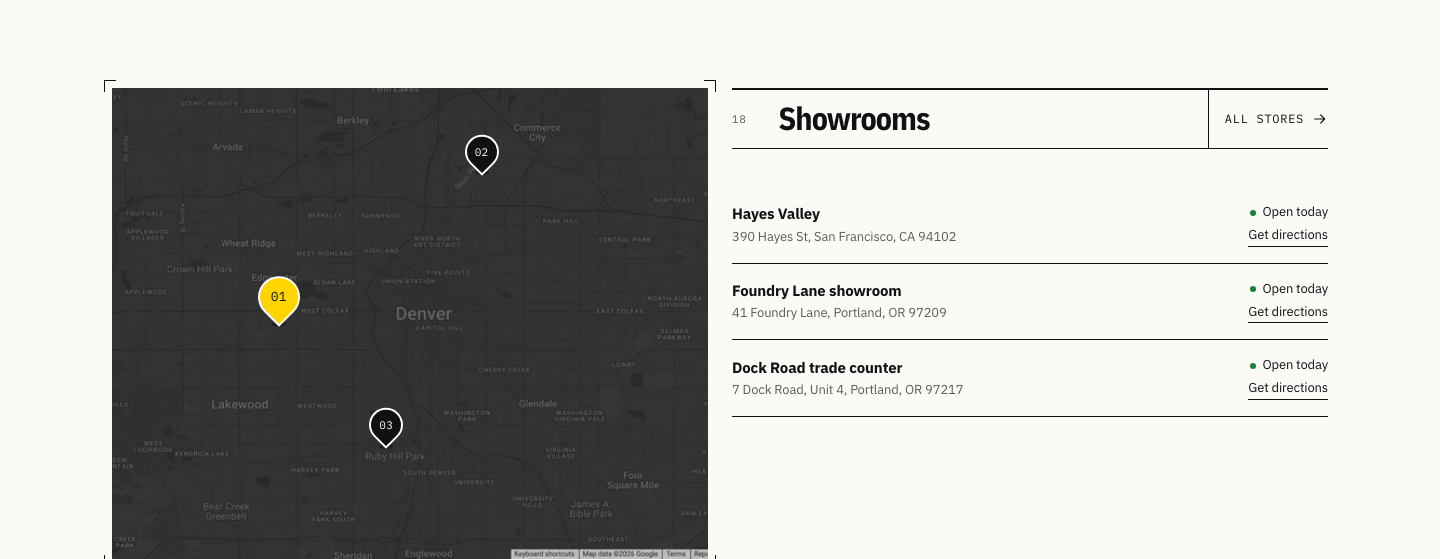
Section settings
| Setting | Type | Options | Default | Notes |
|---|---|---|---|---|
| Layout | Choice | Store list beside map, Searchable store finder | Store list beside map | |
| Heading | Text (bold, italic, links) | Visit a store | ||
| Text | Rich text | Shown when Layout is Searchable store finder. | ||
| Service filters | Text | Comma-separated. Each store lists the services it offers using the same names. Shown when Layout is Searchable store finder. | ||
| Map image | Image | Upload a map of your region. Set each store’s pin position in its block. | ||
| Crop marks | On / off | On | Four corner marks and a FIG. number around the image. Needs Theme settings › Layout › Figure marks. | |
| Figure label | On / off | On | The text under the bottom-left mark. Shown when Crop marks is on. | |
| Figure text | Text | Leave empty to use the image’s alt text, or FIG. 01 when there is none. Shown when Crop marks is on and Figure label is on. | ||
| Link | Link | Shown when Layout is Store list beside map. | ||
| Link label | Text | See all stores | Shown when Layout is Store list beside map. | |
| Color scheme | Color scheme | Scheme 1 | ||
| Top padding | Slider | 0–160px, steps of 4 | 48px | |
| Bottom padding | Slider | 0–160px, steps of 4 | 48px |
Blocks
Store block
One store with its address, hours, services and map pin.
| Setting | Type | Options | Default | Notes |
|---|---|---|---|---|
| Name | Text | Store name | ||
| Street address | Text | |||
| City | Text | |||
| State or region | Text | |||
| Postal code | Text | |||
| Phone | Text | |||
| Status | Text | Short note you keep up to date, for example Open until 8 pm. | ||
| Opening hours | Rich text | |||
| Services | Text | Comma-separated, matching the section’s service filters. |
Map pin
| Setting | Type | Options | Default | Notes |
|---|---|---|---|---|
| Horizontal position | Slider | 0–100%, steps of 1 | 50% | |
| Vertical position | Slider | 0–100%, steps of 1 | 50% |
Presets
Add it from Add section as: Store locator, Store finder.
Last updated on